

Operating & Starting VinFast Evo / Feliz Scooters
Electric scooters do not have an engine roar. The motor is silent and only responds to throttle once the READY indicator appears on the dashboard.
3-Step Rule to get the READY Indicator
You must perform all 3 steps in sequence to unlock the motor:
Turn key to ON position
Insert the physical key and turn it to ON. The digital LCD dashboard will light up.
Kick up the side stand
VinFast scooters feature an electrical side-stand sensor. The scooter will NOT accelerate if the side stand is down.
Hold brake & press P (Parking) button
Squeeze and hold either brake lever, then press the P button on the right handlebar until the green READY sign turns on.
The primary battery MUST be placed in Slot 1 (the inner slot towards the front). Placing a single battery in Slot 2 will prevent the scooter from powering on.
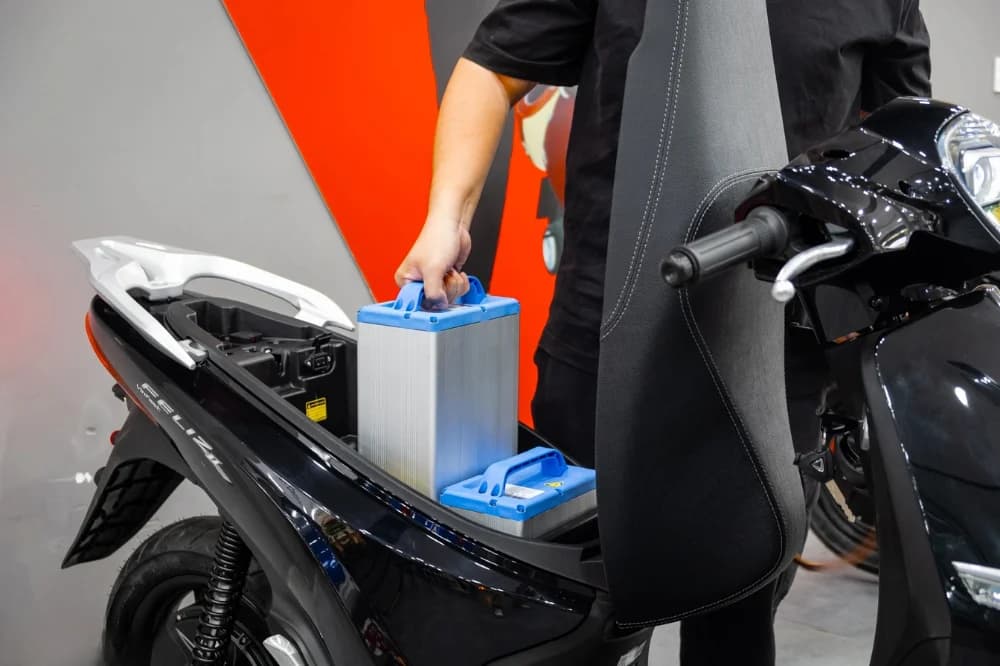
Opening Trunk & Anti-Theft Shutter Key
When the scooter is switched off, turn the key counter-clockwise to release the seat latch. Firmly grasp the top handle of the battery and lift straight up.
Press the small metal button next to the ignition to close the anti-theft shutter. To reopen, insert the magnetic hexagonal key head into the slot and turn counter-clockwise.
Each battery weighs approximately 12kg. Stand close to the trunk or swap cabinet before lifting for optimal balance and safety.
How to Find VinFast Swap Cabinets via "Trạm Sạc EV" App
To view live cabinet locations and verify available full batteries in real time, riders use the dedicated "Trạm Sạc EV" app. Standard Google Maps cannot display live battery availability in cabinets.

3 Steps to check available full batteries with "Trạm Sạc EV"
Browsing the live station map and checking battery counts is 100% free with no account or deposit required.
Download the free app
Search "Trạm Sạc EV" on App Store or Google Play. The map is completely free to view without registration.
Enable GPS & Tap Find Nearby button
Open the app, allow GPS location access, and TAP THE GREEN BUTTON "Nhấn để tìm trạm quanh đây" at the bottom of the main screen (note: tap the button, do not swipe or drag the screen).
Switch to "Đổi Pin" (Battery Swap) tab
Select the Đổi Pin tab to filter V-GREEN swap cabinets. The app displays real-time available full batteries (e.g., 9/10 pin) for each cabinet.
lightbulbPractical Tips from XanhMoto
- •Prioritize cabinets with at least 2 full batteries available to avoid arriving after someone takes the last one.
- •Best swap window: when battery is between 10% and 20%. Do not let the battery drop below 5%.
- •V-GREEN swap cabinets operate 24/7 at public locations across Da Nang & Hoi An.
How to Swap Batteries at V-GREEN Automated Cabinets
The entire swap process takes about 1 minute at the automated smart cabinet with no complicated manual handling.
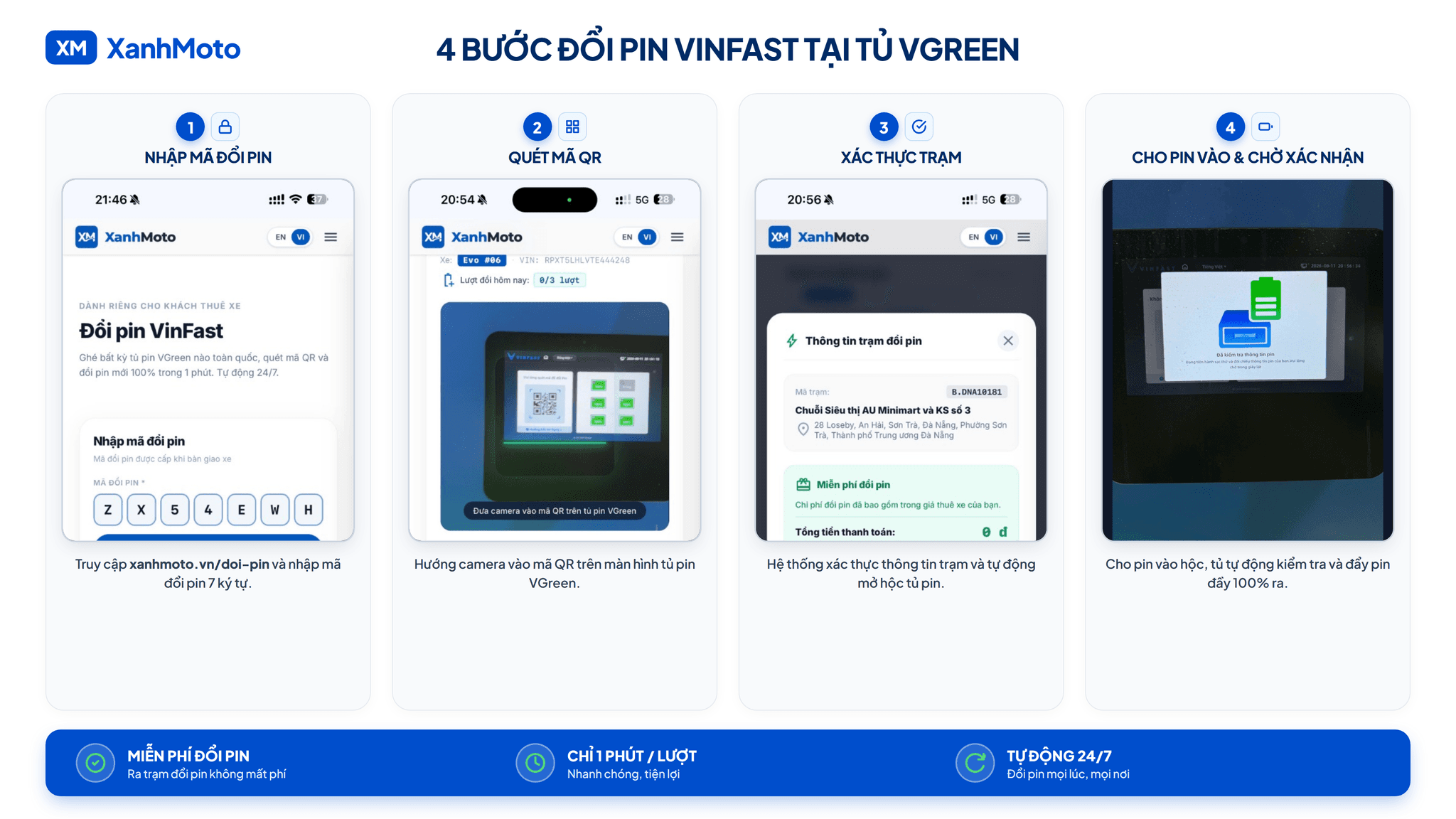
Remove the depleted battery
Turn off the scooter completely, open the trunk, grasp the battery handle firmly and lift straight up. Carry it to the front of the cabinet.
Scan screen QR code & Insert depleted battery
Point your phone camera at the QR code displayed on the V-GREEN swap station screen (on the station screen, not the cabinet body). An empty compartment will pop open. Insert the depleted battery and push it firmly all the way into the slot until the lock clicks shut.
Retrieve 100% full battery & Insert into Slot 1
Once verified, the cabinet automatically unlocks another compartment and pushes out a 100% full battery. Pull it out by its handle, place it gently into Slot 1 inside the trunk, close the seat, and start (READY).
Standing in front of the swap cabinet?
Click the button below to enter your swap code and open the cabinet compartment immediately.
qr_code_scannerOpen Battery Swap Web-AppTroubleshooting & 24/7 Incident Support
XanhMoto store is open 08:00 – 22:00 daily, while our incident reception and customer support line operates 24/7.
4 Common Situations at Swap Stations
Frequently Asked Questions
Need Quick Assistance?
Our customer service and technical team are always ready to answer questions and assist you throughout your rental trip:
Detailed Guides & In-depth Articles
Read our full comprehensive guides from XanhMoto: